
Zero Trust Security Architecture Explained For Beginners
Today, cyber threats are rising fast. Big companies and small businesses in the US face daily attacks. Old security models, which trust users inside the network, now show many weaknesses. That’s where Zero Trust Security Architecture comes in. This approach says: “Never trust, always verify.” But what does that really mean for beginners? Let’s break it down in simple terms.
What Is Zero Trust Security?
Zero Trust Security is a way to protect computer systems. It does not automatically trust anyone, inside or outside the network. Every user and device must prove they are safe, every time they try to access resources. This stops attackers who get past the first line of defense.
A common example: In the past, once you logged in at work, you could access everything. With Zero Trust, you must confirm your identity before opening each system, even if you are already inside the network.
Key Principles Of Zero Trust
Zero Trust is not a single tool—it’s a set of ideas and actions. The main principles are:
- Verify every access request – Always check if the person or device is allowed.
- Least privilege access – Give users only the permissions they need, nothing more.
- Assume breach – Act as if attackers are already inside.
- Segment networks – Break up the network into small parts. Limit movement if an attacker gets in.
- Continuous monitoring – Watch for odd behavior or threats all the time.
These rules help stop hackers from moving freely if they break in.
How Zero Trust Works In Practice
Zero Trust uses several tools and techniques. Here are some common ones:
- Multi-factor authentication (MFA): Requires users to prove who they are in two or more ways, such as a password and a phone code.
- Micro-segmentation: Networks are split into small zones. Each zone has its own controls.
- Identity and access management (IAM): Tracks who is allowed to do what.
- Device verification: Checks if a laptop or phone is safe before letting it connect.
For example, in a US hospital, Zero Trust might stop a hacker who stole a nurse’s password from seeing patient records. The hacker’s device would not pass the trust checks.
Benefits And Challenges
Zero Trust brings many benefits:
- Better protection from data leaks and ransomware
- Limits damage if an attacker gets in
- Helps meet regulations like HIPAA or CCPA
But there are challenges:
- Setup can be complex for large companies
- Older systems may not support all features
- User experience can be less smooth if checks are too strict
Still, most US security experts agree that Zero Trust is now a must-have.
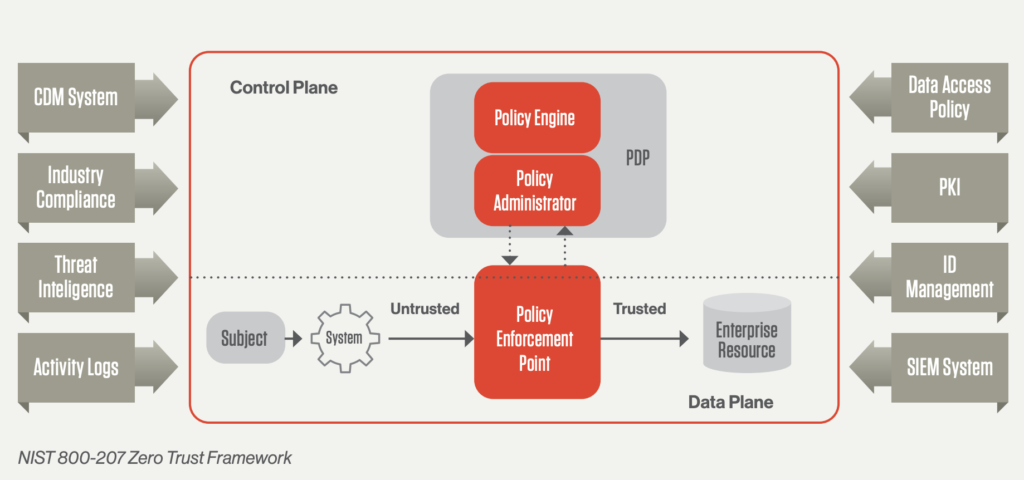
Credit: www.crowdstrike.com
Zero Trust Vs. Traditional Security
Here’s how Zero Trust compares to older security models:
| Feature | Traditional Security | Zero Trust |
|---|---|---|
| Trust Model | Trust inside network | Trust nobody by default |
| Access Control | Broad, based on location | Strict, always checked |
| Attack Response | Slow to detect movement | Limits attacker movement |
Real-world Example
A US bank used Zero Trust to stop a large data breach. Even when a hacker got a real employee’s password, the system asked for extra proof from the device. The hacker failed, and the attack was blocked. This extra check made a big difference.

Credit: www.fortinet.com
Common Mistakes Beginners Make
- Thinking Zero Trust is a product: It is a strategy, not just a tool you buy.
- Not training staff: People need to know how and why checks happen.
- Skipping device checks: Only checking user identity isn’t enough.
Steps To Start With Zero Trust
- Map your data and assets: Know what you need to protect first.
- Start small: Apply Zero Trust to your most important systems.
- Use MFA and strong passwords: Quick wins for better security.
- Monitor everything: Watch for strange access.
- Improve step by step: Zero Trust is a journey, not a one-time fix.
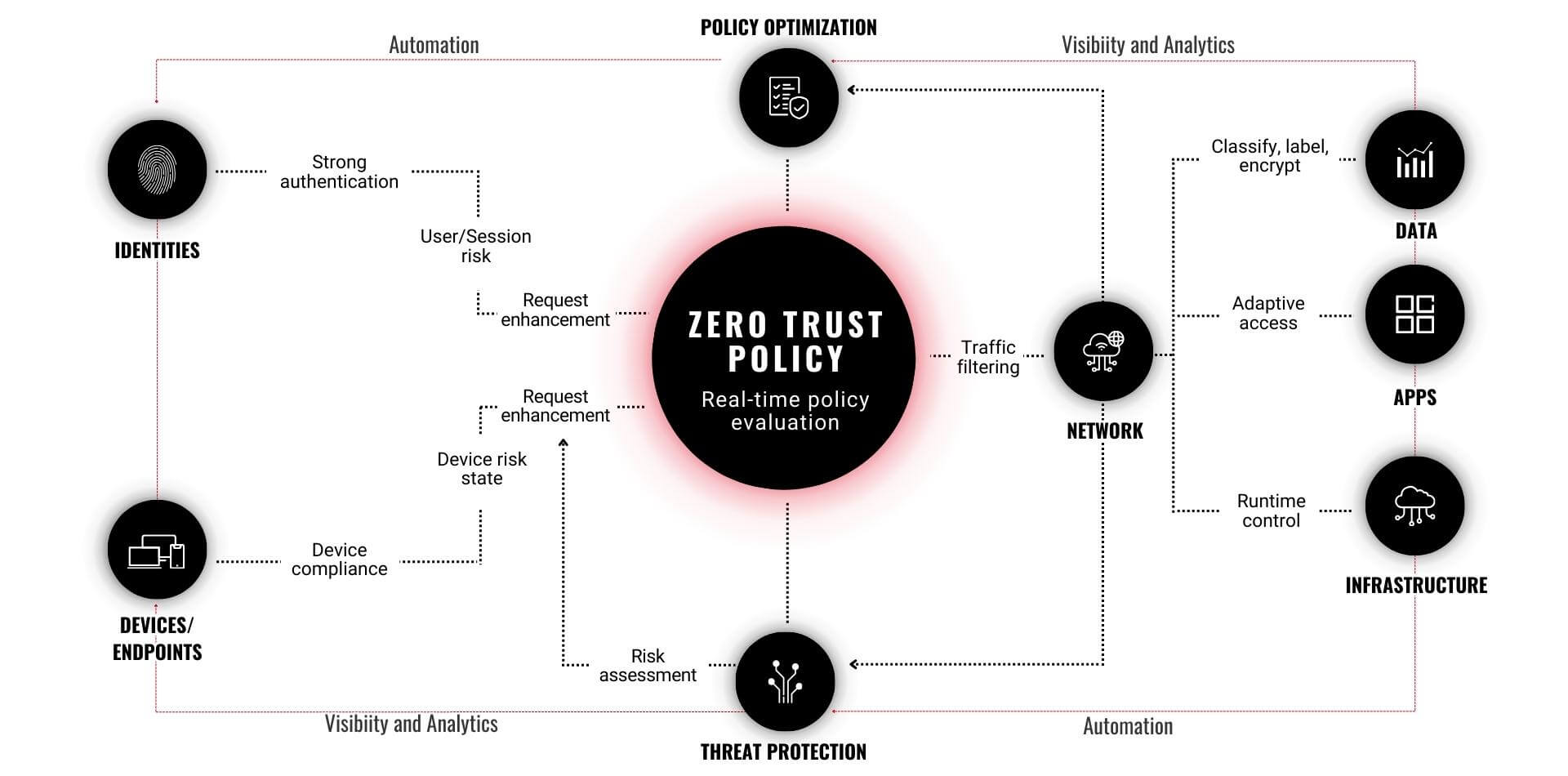
Credit: humanize.security
Cost And Adoption In The Us
According to a 2023 report by Gartner, over 60% of US businesses plan to adopt Zero Trust by 2025. Costs vary, but many cloud tools now include Zero Trust features, making it easier for small businesses to start.
For more technical details, you can visit the Wikipedia Zero Trust page.
Comparison Of Zero Trust Tools
Some popular Zero Trust solutions are:
| Vendor | Main Feature | Best For |
|---|---|---|
| Microsoft Azure | Cloud access controls | Large companies |
| Okta | Identity management | All sizes |
| Zscaler | Network segmentation | Remote teams |
Frequently Asked Questions
What Is The Main Idea Of Zero Trust Security?
The main idea is to never trust anyone by default, even if they are inside your network. Always verify identity and device for every access.
Is Zero Trust Only For Big Companies?
No, businesses of all sizes in the US can use Zero Trust. Many cloud services offer easy ways for small companies to start.
Does Zero Trust Stop All Attacks?
Zero Trust lowers risk and limits damage, but no system is perfect. It is an important layer in a strong security plan.
How Long Does It Take To Set Up Zero Trust?
Time depends on company size and systems. Some see results in weeks for small projects, while big companies may need months.
Are There Free Zero Trust Tools?
Some cloud platforms include basic Zero Trust features for free, like multi-factor authentication and device checks.
Zero Trust Security is now a top defense for US organizations. By understanding the basics and taking small steps, you can make your data and systems much safer—even as threats keep changing.


.jfif)


 Posts
Posts





0 Comments